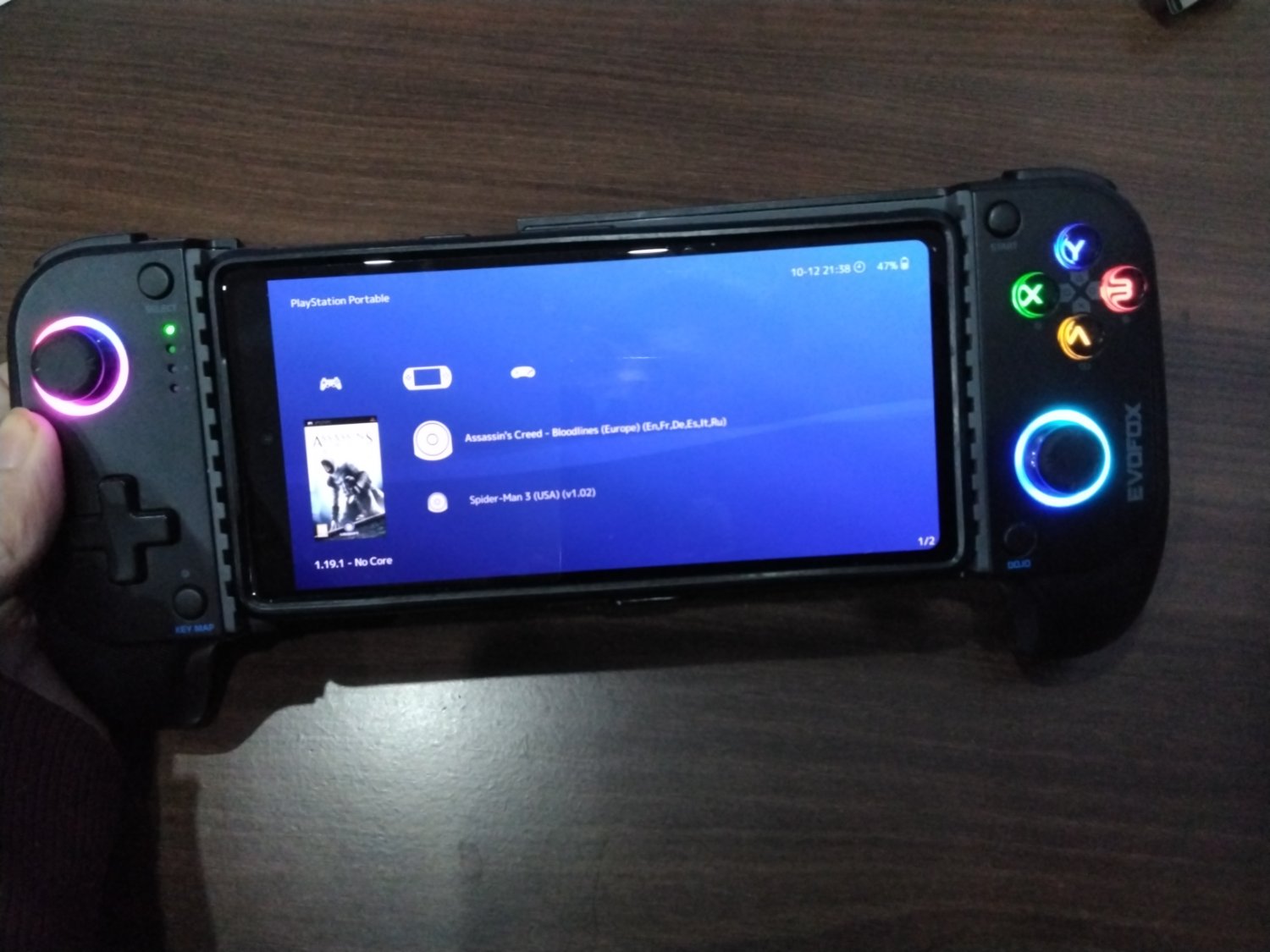
They’re really cheap. This one cost me only 2800 INR (~$30), but the vibrations are terrible. You can get one from a reputed brand for about 50 USD. I think Razor and Gamesir also sell these.
The only Android game I play with this is Fall Guys, that too once a week or so. But primarily I play PSP and PS2 games. Apps like Retroarch provide a really nice UI for retro games, and can make you feel like you’re using a handheld console. Here’s a screenshot of Retroarch:
NetherSX2 is also great. Here’s the screnshot:
I love this thing and would recommend such gamepads to anyone looking for a handheld console experience.
Here’s a few more photos of this.
Btw, it can also be connected to any PC with a Bluetooth connection. This one can also connect to PlayStation 4 as well. It will work on PS5 too, but only in UI and PS4 games.
PS - Sorry for the blurry pictures. i don’t have a good secondary camera.
Edit - I wanted to add a bit about Retroachievements as well. If you’re into retro gaming, and don’t use Retroachievements, WHY? Maybe because you didn’t know about it? Go to retroachievements.com and see if you can get all the achievements from your favourite childhood game. You can connect Retroachievements via only Retroarch, NetherSX2 and PPSSPP emulators only. Others are not supported yet (on Android).
I have the Razer one. It said it was for Android, and I do have an Android phone, and it basically works, but back then, iPhones were using Lightning. For whatever reason, it does not support iPhones. My iPhone has a bigger screen (6.9" vs 5.8") and is more powerful. The Android phone is good enough for retro emulation, of course, but iOS wins Nintendo emulation with Delta, due to the Google Drive backup feature. I have a Flygrip on my iPhone, and I have an 8bitdo Bluetooth controller that can pair to the iPhone. I think Xbox controllers can, too. My old Xbox One controller pairs to my Macs just fine. Maybe it’ll pair to iPhone.
Fortunately RetroArch is on iOS as well. I don’t think it can use all the cores, but it can use the ones that count (like PS1 and prior). I know on Android you get all of them, including PS2, PSP, Wii, NGC, and so on. But my Android phone is a Galaxy S10 (2019), so I wouldn’t expect it to run the newer games. My iPhone 16 Pro Max is capable, but won’t run the actual cores due to iOS restrictions.
I wonder how hard it would be to homebrew a Raspberry Pi, a custom screen, and a custom controller. Though for what you’d spend doing it (and the value of your time!) there are existing devices (mostly from China, I think) that are meant to do exactly that. But I wouldn’t know where to start with those.
I can even play games on my Apple Watch, but you gotta think, with only one hand controlling it (assuming you’re wearing the watch), you can’t play too many games. I have Zelda, as a proof of concept, but Pokemon is far more likely.
These days, just about anything can emulate. Not too many of them can do it well. A good example is, the original Super Mario Bros… The latency is way too high to play it like you can on original hardware, and it sucks that as advanced as our tech is, the game is virtually unplayable in any emulator. It feels like you’re playing on an ice level (like in Mario 2) almost with how slow the game is to react. We didn’t have this problem in the 80s playing on an actual NES. Even the newer Nintendo consoles are just emulating, and they are subject to the same latency issue. Even first-party Nintendo games on modern consoles can’t beat the latency. For example, on Animal Crossing — fucking Animal Crossing — fishing is impossible to do if a fish has 3 (of 5) stars of rarity or higher. The fucking second it bites, you press the button, latency got ya — you were too late. But undock the Switch and I can catch 5 star sharks, whale sharks, the fucking Coelacanth — every time. It’s a game for grade school kids. It’s not hard. But latency makes it go from “tricky” to “what the fuck why is this game so hard?” real quick.
Thanks for bringing Delta to my attention! I use my Steam Deck for emulation - but now, I have another rabbit hole to go down for when I need to pack ultralight!
Any obvious iOS restrictions, assuming I’d be primarily interested in SNES gaming and have local access to any/every ROM file?
Okay, say we’re standing face to face and I’m showing you my iPhone. I swipe between library pages showing you my games. I go into Final Fantasy III and show you a 50 hour save. Then, to your astonishment, I swipe up to Home, then uninstall the app. “But your save!” you say, but I’m just smiling. I go into the App Store, re-download Delta. I show you my empty library. Then I go to sign into Google Drive, turning my back for privacy. I turn back and show you I’m hitting Enter/Submit/Log In/whatever. We watch as my games repopulate the library. I open Final Fantasy III. My save is intact.
You’re excited. You want Delta too. So you download it on yours. You have the games at home and you’ll load them up later, but you wanna get some time in on Super Metroid right now. So I scroll down to it, long press it, and tap AirDrop. You swipe down, long-press your connections widget, tap AirDrop, and change it to “Everyone for 10 minutes.” Your iPhone shows up, and I AirDrop you the game. Your iPhone receives it, and it opens in Files. You tap on it, it gives you the option to open it in Delta. It’s now in your library. And backed up to your Google Drive account, if you set that up.
Android guys have some better options than Delta, for sure, but they also kinda wish they had Delta.
Delta emulates only Nintendo and only up to the NDS. That said, as a Super NES gamer, you should be aware of better ports on later systems. Most notably IMO, Zelda 3 on Super NES vs Four Swords on GBA. Four Swords is a multiplayer thing, but it also includes Zelda 3 but with better translation, widescreen support, a better inventory, updated translations, and some other fixes. Of course, if you’re running a JP Zelda 3 1.0 for exploits and speed runs, well, that’s different. (You can do that, too.)
Razer Kishi. That’s what I have — but mine only supports Android (I have one of each). It’s USB-C, but doesn’t support my iPhone 16 Pro Max. That being said, if your controller is recognised by iOS, it should work. I use the 8bitdo controller that looks like a Super NES controller, only it has analogue sticks and a second set of triggers (like a PlayStation controller). Works great.
But yes, since Apple revamped the Files app, every app that exposes its files to iTunes/macOS should have its files accessible right in Files, and you can move from the app folder to the download folder and vice-versa. It still isn’t as open as Android, but functionally, it’s just as good. I have no problem moving files between my iPhone and either my Android phone, or my wife’s. What you really need for this is an app that will set up a file host, and that app also needs to expose its files to the Files app. Have one host, have the other connect to it, two-way communication over WiFi. No AirDrop needed, they just have to both be on the same WiFi network (could be one’s hotspot).
You are not logged in. However you can subscribe from another Fediverse account, for example Lemmy or Mastodon. To do this, paste the following into the search field of your instance: [email protected]
Welcome to the largest gaming community on Lemmy! Discussion for all kinds of games. Video games, tabletop games, card games etc.
Rules
1. Submissions have to be related to games
Video games, tabletop, or otherwise. Posts not related to games will be deleted.
This community is focused on games, of all kinds. Any news item or discussion should be related to gaming in some way.
2. No bigotry or harassment, be civil
No bigotry, hardline stance. Try not to get too heated when entering into a discussion or debate.
We are here to talk and discuss about one of our passions, not fight or be exposed to hate. Posts or responses that are hateful will be deleted to keep the atmosphere good. If repeatedly violated, not only will the comment be deleted but a ban will be handed out as well. We judge each case individually.
3. No excessive self-promotion
Try to keep it to 10% self-promotion / 90% other stuff in your post history.
This is to prevent people from posting for the sole purpose of promoting their own website or social media account.
4. Stay on-topic; no memes, funny videos, giveaways, reposts, or low-effort posts
This community is mostly for discussion and news. Remember to search for the thing you’re submitting before posting to see if it’s already been posted.
We want to keep the quality of posts high. Therefore, memes, funny videos, low-effort posts and reposts are not allowed. We prohibit giveaways because we cannot be sure that the person holding the giveaway will actually do what they promise.
5. Mark Spoilers and NSFW
Make sure to mark your stuff or it may be removed.
No one wants to be spoiled. Therefore, always mark spoilers. Similarly mark NSFW, in case anyone is browsing in a public space or at work.
6. No linking to piracy
Don’t share it here, there are other places to find it. Discussion of piracy is fine.
We don’t want us moderators or the admins of lemmy.world to get in trouble for linking to piracy. Therefore, any link to piracy will be removed. Discussion of it is of course allowed.









I have the Razer one. It said it was for Android, and I do have an Android phone, and it basically works, but back then, iPhones were using Lightning. For whatever reason, it does not support iPhones. My iPhone has a bigger screen (6.9" vs 5.8") and is more powerful. The Android phone is good enough for retro emulation, of course, but iOS wins Nintendo emulation with Delta, due to the Google Drive backup feature. I have a Flygrip on my iPhone, and I have an 8bitdo Bluetooth controller that can pair to the iPhone. I think Xbox controllers can, too. My old Xbox One controller pairs to my Macs just fine. Maybe it’ll pair to iPhone.
Fortunately RetroArch is on iOS as well. I don’t think it can use all the cores, but it can use the ones that count (like PS1 and prior). I know on Android you get all of them, including PS2, PSP, Wii, NGC, and so on. But my Android phone is a Galaxy S10 (2019), so I wouldn’t expect it to run the newer games. My iPhone 16 Pro Max is capable, but won’t run the actual cores due to iOS restrictions.
I wonder how hard it would be to homebrew a Raspberry Pi, a custom screen, and a custom controller. Though for what you’d spend doing it (and the value of your time!) there are existing devices (mostly from China, I think) that are meant to do exactly that. But I wouldn’t know where to start with those.
I can even play games on my Apple Watch, but you gotta think, with only one hand controlling it (assuming you’re wearing the watch), you can’t play too many games. I have Zelda, as a proof of concept, but Pokemon is far more likely.
These days, just about anything can emulate. Not too many of them can do it well. A good example is, the original Super Mario Bros… The latency is way too high to play it like you can on original hardware, and it sucks that as advanced as our tech is, the game is virtually unplayable in any emulator. It feels like you’re playing on an ice level (like in Mario 2) almost with how slow the game is to react. We didn’t have this problem in the 80s playing on an actual NES. Even the newer Nintendo consoles are just emulating, and they are subject to the same latency issue. Even first-party Nintendo games on modern consoles can’t beat the latency. For example, on Animal Crossing — fucking Animal Crossing — fishing is impossible to do if a fish has 3 (of 5) stars of rarity or higher. The fucking second it bites, you press the button, latency got ya — you were too late. But undock the Switch and I can catch 5 star sharks, whale sharks, the fucking Coelacanth — every time. It’s a game for grade school kids. It’s not hard. But latency makes it go from “tricky” to “what the fuck why is this game so hard?” real quick.
Thanks for bringing Delta to my attention! I use my Steam Deck for emulation - but now, I have another rabbit hole to go down for when I need to pack ultralight!
Any obvious iOS restrictions, assuming I’d be primarily interested in SNES gaming and have local access to any/every ROM file?
Literally no iOS restrictions on Delta.
Okay, say we’re standing face to face and I’m showing you my iPhone. I swipe between library pages showing you my games. I go into Final Fantasy III and show you a 50 hour save. Then, to your astonishment, I swipe up to Home, then uninstall the app. “But your save!” you say, but I’m just smiling. I go into the App Store, re-download Delta. I show you my empty library. Then I go to sign into Google Drive, turning my back for privacy. I turn back and show you I’m hitting Enter/Submit/Log In/whatever. We watch as my games repopulate the library. I open Final Fantasy III. My save is intact.
You’re excited. You want Delta too. So you download it on yours. You have the games at home and you’ll load them up later, but you wanna get some time in on Super Metroid right now. So I scroll down to it, long press it, and tap AirDrop. You swipe down, long-press your connections widget, tap AirDrop, and change it to “Everyone for 10 minutes.” Your iPhone shows up, and I AirDrop you the game. Your iPhone receives it, and it opens in Files. You tap on it, it gives you the option to open it in Delta. It’s now in your library. And backed up to your Google Drive account, if you set that up.
Android guys have some better options than Delta, for sure, but they also kinda wish they had Delta.
Delta emulates only Nintendo and only up to the NDS. That said, as a Super NES gamer, you should be aware of better ports on later systems. Most notably IMO, Zelda 3 on Super NES vs Four Swords on GBA. Four Swords is a multiplayer thing, but it also includes Zelda 3 but with better translation, widescreen support, a better inventory, updated translations, and some other fixes. Of course, if you’re running a JP Zelda 3 1.0 for exploits and speed runs, well, that’s different. (You can do that, too.)
That’s awesome, didn’t even think of how useful AirDrop could be in that situation!
How’s controller support? I have a Razer Kishi V2 I bought way back when to play the Rockstar games, that’s just otherwise gathering dust.
It’s nighttime here in Australia - will load up some files and test it out tomorrow morning! 😁
Razer Kishi. That’s what I have — but mine only supports Android (I have one of each). It’s USB-C, but doesn’t support my iPhone 16 Pro Max. That being said, if your controller is recognised by iOS, it should work. I use the 8bitdo controller that looks like a Super NES controller, only it has analogue sticks and a second set of triggers (like a PlayStation controller). Works great.
But yes, since Apple revamped the Files app, every app that exposes its files to iTunes/macOS should have its files accessible right in Files, and you can move from the app folder to the download folder and vice-versa. It still isn’t as open as Android, but functionally, it’s just as good. I have no problem moving files between my iPhone and either my Android phone, or my wife’s. What you really need for this is an app that will set up a file host, and that app also needs to expose its files to the Files app. Have one host, have the other connect to it, two-way communication over WiFi. No AirDrop needed, they just have to both be on the same WiFi network (could be one’s hotspot).
Is the latency due to the emulator or the Bluetooth connection? I’ve played all sorts of games on my PC without latency issues.